Expressions and variables
Expressions calculate values from the monster's statistics instead of using fixed numbers. They are useful when a value should change automatically as the monster's Challenge Rating, level, ability scores, or other statistics change.
For example:
8 + PROF + WIS
calculates a saving throw DC using:
8as the base DCPROFas the monster's proficiency bonusWISas the monster's Wisdom modifier
For a monster with a +6 proficiency bonus and a +4 Wisdom modifier, the expression evaluates to:
8 + 6 + 4 = 18
Expressions can only be used in fields that explicitly support them. The editor identifies these fields and reports expressions that contain unknown variables or invalid syntax.
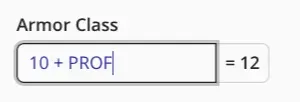
Variable names are case-insensitive, and spaces inside expressions are optional. For example, these expressions are equivalent:
8 + PROF + WIS
8+prof+wis
Variables
Variables are placeholders for values taken from the monster being edited. When the corresponding statistic changes, every expression using that variable is recalculated automatically.
Progression and Size
| Variable | Value |
|---|---|
CR | The monster's Challenge Rating |
LVL | The monster's level or number of Hit Dice |
PROF | The monster's proficiency bonus |
SIZE | The monster's size as a number: 1 Tiny, 2 Small, 3 Medium, 4 Large, 5 Huge, or 6 Gargantuan |
HD | The number of sides in the monster's Hit Die, such as 6 for a d6 or 10 for a d10 |
Ability Scores
The abbreviated ability variables represent ability modifiers:
| Variable | Value |
|---|---|
STR | Strength modifier |
DEX | Dexterity modifier |
CON | Constitution modifier |
INT | Intelligence modifier |
WIS | Wisdom modifier |
CHA | Charisma modifier |
Add VALUE to an ability abbreviation to use its full ability score instead:
| Variable | Value |
|---|---|
STRVALUE | Strength score |
DEXVALUE | Dexterity score |
CONVALUE | Constitution score |
INTVALUE | Intelligence score |
WISVALUE | Wisdom score |
CHAVALUE | Charisma score |
For example, a monster with Strength 18 has:
STR = 4
STRVALUE = 18
Defense and Hit Points
| Variable | Value |
|---|---|
AC | Armor Class |
HP | Hit point maximum |
Movement
Movement variables represent distances in feet.
| Variable | Value |
|---|---|
SPEED | Base walking speed |
BURROW | Burrowing speed |
CLIMB | Climbing speed |
FLY | Flying speed |
HOVER | Hover movement value |
SWIM | Swimming speed |
Operators
Expressions support the following mathematical operators:
| Operator | Operation | Example |
|---|---|---|
+ | Addition | STR + PROF |
- | Subtraction | SPEED - 10 |
* | Multiplication | LVL * 2 |
/ | Division rounded down | 3 / 4 evaluates to 0 |
\ | Division rounded up | 3 \ 4 evaluates to 1 |
> | Greater than | LVL > 5 |
< | Less than | LVL < 5 |
= | Equal to | SIZE = 4 |
Use parentheses to control the order in which operations are evaluated:
10 + 5 * (LVL / 3)
Signed numbers are also supported:
-5
+2
STR * -2
Division
The editor provides two division operators because monster statistics usually require whole numbers.
The / operator rounds the result down:
3 / 4 = 0
7 / 4 = 1
The \ operator rounds the result up:
3 \ 4 = 1
7 \ 4 = 2
This makes it possible to control exactly when a value increases.
For example:
LVL / 4
increases at levels 4, 8, 12, and so on, while:
LVL \ 4
already evaluates to 1 at level 1.
Comparisons
Comparison operators return:
1when the comparison is true0when the comparison is false
This allows expressions to apply a value only when a condition is met.
For example:
(LVL > 3) * PROF
Before level 4, LVL > 3 is false and evaluates to 0:
0 * PROF = 0
From level 4 onward, it evaluates to 1:
1 * PROF = PROF
Multiple comparisons can be combined to create values that become available at specific levels:
(LVL > 16) + (LVL > 23)
This expression evaluates to:
0before level 171from level 172from level 24
Dice in Expressions
Dice expressions such as 1d6 and 2d8 can be used inside calculations:
2d8 + CON
When dice are used inside an expression, the editor uses their deterministic average instead of rolling them. For example:
1d6 = 3
2d6 = 7
1d8 + 3 = 7
Dice written inside expressions are therefore not clickable or rollable. To create a clickable dice roll in an action, use an Inline Value instead:
{1d6 cold damage}
Examples
Saving Throw DC
Calculate a Constitution-based saving throw DC:
8 + PROF + CON
Size-Based Damage Die
Calculate the number of sides of a damage die from the monster's size:
SIZE * 2
This produces:
| Size | Result |
|---|---|
| Tiny | 2 |
| Small | 4 |
| Medium | 6 |
| Large | 8 |
| Huge | 10 |
| Gargantuan | 12 |
The result can be used as the die size of an attack.
Level-Based Increase
Increase a value by 2 every four levels, starting with a base value of 2:
(LVL / 4) * 2 + 2
This evaluates to:
| Level | Result |
|---|---|
| 1 | 2 |
| 4 | 4 |
| 8 | 6 |
| 12 | 8 |
Scaling Distance
Start at 10 feet and add 5 feet every three levels:
10 + 5 * (LVL / 3)
Limited Uses
Set the number of uses to the monster's Charisma modifier, with a minimum of one use:
(CHA > 0) * CHA + (CHA < 1)
This evaluates to 1 when the Charisma modifier is zero or negative. Otherwise, it evaluates to the Charisma modifier.